Checkout: Save a File
Checkout > Digital Files > Save a File
click to enlarge
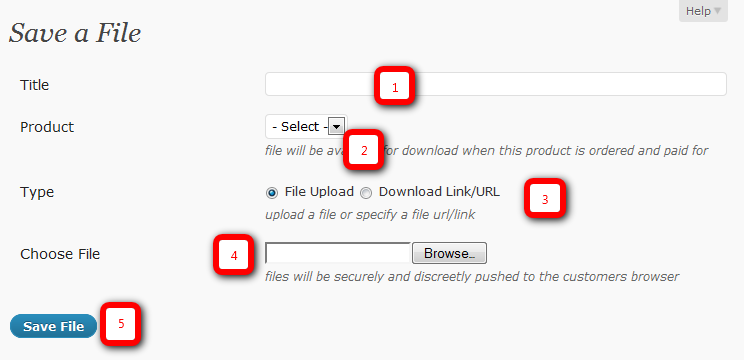
1. Title
This title/name will be shown throughout the shop to both yourself as administrator and to the customers viewing the front of your shop. Choose this title carefully in order for it to be understandable by your customers viewing your products. Keep the title below 150 characters.
2. Product
This a a dropdown list of files that will be available for download when this product is ordered and paid for. Both digital and tangible products will be shown in this drop down menu.
3. Type.
This specifies a File or a URL that the customer will download from. If you choose ‘File Upload’ you’ll be uploading a file from your computer.
4. Choose a file.
Click the Browse button to upload the file that the user will download once it has been paid for. Files will be securely and discreetly pushed to the customers browser.
5. Save File
Once you have completed filling in information on the page click ‘Save’ to save changes.
Earn Money by Referring People
Refer customers to us with your affiliate link and earn commission on sales from your link.